Pages

Showing posts with label software. Show all posts

August 22, 2017

Beautiful Mac OS Terminal

This post is about making your Terminal window beautiful and easy to use. I use all of them on Mac OS, I guess they are compatible with all UNIX systems.

1. HTTPie for working with HTTP requests

This tool can be used instead of cURL. It just makes responses beautiful (but it's quite powerfull tho):

2. Oh My Git for working with GIT repositories

This tool prints information about Git repo status: branch which you are currently using, number of unpushed commits, tags, untracked files etc. Official readme has a lot of screenshots:

3. ~/.bash_profile for configuring prompt

I configured my promp according to this article, so in my ~/.bash-profile file I have the folloring part:

Which makes prompt look like this:

4. ~/.vimrc for configuring Vim

If you already use Vim - read A Good Vimrc. If not - see Vim isn’t that scary. Here are 5 free resources you can use to learn it.

Here is my ~/.vimrc file:


5. ~/.bash_aliases for quick commands

I have already wrote about aliases that I use here, here and here, but as I already mentioned Git here, I want to share one more alias I have:

It transforms git log output into something like this:

February 9, 2017

Profile Page 2.0

Two weeks ago I published my Profile Page. Since then some changes were made, that I think are worth sharing.

First of all, blog changes. As I have now profile page I don't need to keep same stuff here, so blog design has been simplified: pages with extensions and the right panel with some weird stuff has been removed to give more space to post content. I think I will make some more design changes in the near future.

Second big stuff: both FireFox extensions URL&p and JIRA Issue Opener has been finally refactored and redesigned. So now they are in consistancy with Chrome extensions and should properly work with final FireFox versions.

After reading an article An opinionated guide to writing developer resumes in 2017 I decided to remove skill progress bars from the page and CV. Now there are two sections of Strong and Knowledgeable technical skills. Also short descriptions of previous experience has been added to CV.

One more modern thing that I have completely forgotten about is page sharing in social media. So this time I added some meta tags to help Facebook and other medias better share my page. Good article about sharing: A Guide to Sharing for Webmasters.

At last, I have encoutered interesting fact: fixing general and fundamental architecture things automatically fixes several small bugs. Of course, I knew it before, but I have never experienced it personally. For example, I am a fan of SVG pictures, but in Microsoft Edge they looked strange. I didn't pay much attention to this compatability bug, but at some point I started to optimize pictures for web. And it turned out, that you should never use text as a picture. If you have only text you should use HTML+CSS (and almost always it's possible to get the same result as with picture). So I migrated all headers in profile section from pictures to text and the Edge problem was automatically fixed.

January 29, 2017

Profile Page with HTML5 and CSS3

I decided to learn about new web technologies, so I have a plan to build a few small projects. Basics first - profile page from scratch (without any CMS-s and templates) - irina-ivanova.gitlab.io.

All the source code of the page and description about used technologies can be found in GitLab repo gitlab.com/irina-ivanova/irina-ivanova.gitlab.io.

Shortly: HTML5+CSS3 (and a little bit of AngularJS to show last 3 posts from this blog). New challenges for me were responsive design (which turned to be not so hard as I thought), SEO and performance (images and fonts optimization, SVG, content optimization etc).

Also I tried to use new Git manager GitLab and I love it! GitLab, unlike GitHub, allows to create private repos for free. Also there are a lot of free build in functionality like milestones, issues, Kanban board, continues integration, hosting the page etc. I'm not only host this new profile page there, but I migrated all my extensions and scripts from GitHub. Speaking of extensions, I redesigned them all (actualy, only Chrome ones for now), so they should be more fresh and modern now. GitLab has one downside: UI is a litle bit slow and continues integration sometimes pending the changes for an hour (but not too often).

If you are interested in details about used tehnologies and resources - see README file in the repo. There are some links on articles that being used in the process.

Some surprises during this experience:

P.S. The day I was planned to publish the page and this post I've got a subscription email with the article An opinionated guide to writing developer resumes in 2017. A lot of things in my CV are incorrect and I plan to change it in the near future.

November 19, 2016

Use Oracle Data Base in Command Line


Cadmus Asks the Delphic Oracle Where He Can Find his Sister, Europa by Hendrik Goltzius, 1615


Sometimes I need to make some quick changes in data base. Or I need to do several changes using some patterns and templates. In that case I don't want to open editor (I use DataGrip) and wait for loading all resources, connecting to DB, opening SQL window and inserting or copying SQL query. I am that kind of person who keeps open only those applications that I am going to use in next 30 min. If I don't plan to use something in next half an hour I close it, so every opening takes some time and effort.

The best way to save time and effort is command line or, actually, scripts. SQLPlus is a great tool for using Oracle data base in the console. You can find instructions about installing SQLPlus on MacOS on StackOverflow: Oracle Sqlplus client on Mac.

The annoying thing about using data base in the terminal is connecting: you have to remember and write all credentials of data base every time you want to connect to it. But, as usually, scripting resolves this problem. I wrote simple Bash script connect-to-oracle-db.sh, that opens connection using small alias as an input. For example, I write sql test in terminal and it opens connection with test data base where I can write some SQL right ahead. Instead of test it can be any base that I work with: demo, live, production etc.

Second script that I use is changing some value in specific data base in specific table. Some times one of the clients asks me to change specific data in their DB, so now instead of opening an editor I can just run a script with parameter given by client and it changes all the data, which saves me time and doesn't disturb my attention on other tasks so much. The script looks something like that:


Of course, SQLPlus doesn't replace editors like SQL Developer or DataGrip, but it can save a lot of time and effort in performing small and routine tasks.

February 6, 2015

Colorize Your Logs With Rainbow

If you are tired of digging information from long monotone logs, then I suggest you to colorize them with Rainbow.

It's very simple tool (written in python), that basically colorizing (and do some other formatting too) any output that you can get: tail, less, vi, ping, ... .

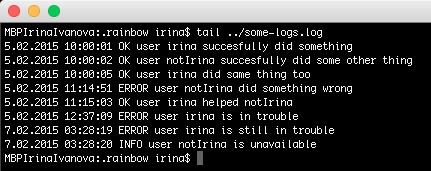
Plain boring tail output:

Same output with rainbow parameter --red='.*ERROR.*', which means color all text red that matches regular expression .*ERROR.*:

One more example: --blue='irina' (make all mentions about me blue):

With rainbow you can also make config files, where you can describe how you want to process some file. Here is a simple configuration file:
And here is output with this configuration:

I've tried many different tools for colorizing logs and rainbow seems the best for me: it's very simple (you don't need to learn new syntax), it can work both individually and with configuration files, it works with any output that I need to make.

June 18, 2014

FF Add-On FoxReplace

Very nice add-on for FireFox - FoxReplace, which replaces text in web pages.

You can define a substitution list and apply it automatically or at your own discretion, or make individual substitutions. You can use this as a filter, or just for fun :)

My blog without add-on:

With add-on:

I work in international project and we have different applications in different languages. And I need to provide a support in this applications. I use this add-on to translate some basic texts (like menu items) before resources are translated by developers or in applications where I can not change the language. It speeds up my support and ability to find the right component in application with unknown language. You can also possibly use it in demo's: with this add-on your application doesn't need to support different languages, you can add translations just for demonstration.

And the whole beauty of this add-on is flexibility - you can configure different patterns for different domains, disable\enable some patterns and even export\import settings (which makes very easy to share them with colleges).

So, if you have an international application - it's good to know about existence of this add-on. Maybe it can help to speed up some of your tasks.

May 14, 2014

q - Text as Database

Nice software, that allows treat text as database - q Text as data.

Shortly, it allows to perform SQL-like queries in tabular text. For example, we have some file.txt with following data:
1 646524 some_text
5 878060 some_other_text
9 676876 some_text


And if q is installed we can perform SQL query like this (where cN is column number):
q "SELECT sum(c1), c3 FROM file.txt WHERE c2 > 600000 GROUP BY c3 ORDER BY 2"

The output will be:
5 some_other_text
10 some_text


Very simple (for those who knows SQL) and convenient way to work with big files with tabular data.

In our project we use it to obtain data about slow java methods in our application: once a day automated script extracts data about execution time of methods from logs and then aggregates executed text with q to group methods and show the slowest and most frequent of them (and then we use AWK to show final result in HTML table).

So, It's good to know about this tool for those, who encounter with tabular texts.

May 7, 2014

XRebel - Revolution in Exploratory Testing


In April Estonian company ZeroTurnaround (authors of JRebel) releases beta version of XRebel. I think it's the most useful tool for testing that I ever had!


XRebel is a -javaagent JVM plugin, that shows you 3 types of data (at least, for now): exceptions, session data and SQL queries. First one is easy - it shows exceptions that were thrown by your application (even if they are not visible in GUI). Session data (attribute name, value, value size, value size difference compared to the previous state of the session) - OK, maybe for someone it is useful.

But the last one - SQL queries - is magic. It shows all SQL queries with parameters that application does in a session. And it shows not only SELECT queries, but also calls for functions (call some_package.function(null, 'some parameter', 13, 'en', null)).
Possibility to see queries with real time parameters without digging a code makes testing way more faster, easier and more complete (sometimes it's not possible to control all conditions, but now you can see them). I think this tool is revolutionary for exploratory testing - now you are able to understand the flow of data with exploring application, not code.


I have 13 SQL queries in session that were executed in 586ms (you can see queries by clicking on the icon);


Total size of session is 887.7 KiB, difference compared to the precious state is +14.3 KiB;


0 exceptions;

Send feedback (it's possible to send log file);

Settings.


Some nice points that are not related to the functionality:
  • very easy installation - you should just download XRebel and include it't path into JVM startup arguments
  • fast feedback - you can send questions, suggestions, bugs to ZT about XRebel and they answer very fast, which is nice
  • daily updates - there are available two builds: stable version and nightly build (which updates every day), so they improve tool very fast

You can't simply download it yet, but you can request a private beta invite and if you are lucky - can use beta version for free for one month.

April 8, 2014

stringG v3.2

New version of stringG is available with new dev design!


There is no new functionality - only design. I am reading Testing Applications on the Web (by Hung Q. Nguyen, Bob Johnson and Michael Hackett) and the chapter about design and performance made me think about software target users. So I decided that testers (and all IT users) will like so called terminal design with dark background and monospace font.
Also I am using now new text editor Atom. I'll write about it later when I get enough experience with it.

March 18, 2014

stringG v3.1

New version of String Generator with new name stringG is available!
Working with string generatorWorking with length calculator

So main new functionality is disabling not active part as You can see on pictures. When You focusing on string generating the bottom part of length calculation is shadowed. And vice versa - if You focusing on bottom part of length calculation the top part is shadowed.

One more big change - new name. Reason is simple: String Generator is too long and I believe that good name is a short one, so stringG it is.

I've already wrote previously about using LeanKit software for organizing stringG (and spanD) projects. They give full Portfolio edition free of charge for first 30 days. So meanwhile my free Portfolio edition has expired and now I am using the Basic level. I was afraid, that I'll loose a lot of good functionality, but actually I haven't lost anything - the Basic level gives all what I need for such small projects. So, if You need a tool for organizing Your tasks - LeanKit is a really good candidate.


See new posts:
April 8, 2014 stringG v3.2

March 1, 2014

String Generator v3.0

New version of String Generator extension is available:

Changes in last version:
  • Code refactoring according to Google Security Tips
  • Design changes
One important update in the process: this is the first version, when I tried to use agile process management tool LeanKit (I heard about it on Saturday Agile X) - really useful tool for managing small projects (maybe big too), now developing process is more organized. And nice thing that it is free of charge (basic mode).


See new posts:
March 18, 2014 stringG v3.1
April 8, 2014 stringG v3.2

January 15, 2014

Quietnet - Spy Chat

Very interesting repo in GitHub - quietnet.
Simple chat program using near ultrasonic frequencies. Works without Wifi or Bluetooth and won't show up in a pcap.
So basically there is 2 scripts send.py and listen.py. You can send ASCII messages, send.py transforms it into (near) ultrasonic sound and listener transforms it back into ASCII message.
With MacBook Pro native speakers it didn't work. But with microlab external speakers works pretty well (sender on the left and listener on the right):
As You can see, not all messages works perfectly: first 2 messages were not successfully sent, third is misspelled. But all others are transported perfectly!
Software does not have any practical profit (and the distance between sender and listener is limited by speakers volume and microphone sensitivity), but it very interesting to play with it.

April 25, 2013

Screen Capture Tool Rate

Often easy way to report a bug is to make picture of screen. Until that day I had to use Gadwin tool for that purposes and if I needed to do some marks - I used MS Paint. But that process is taking quite a lot time and effort, so I decided to find a new tool to capture and edit pictures faster and easier.

I had further requirements:
* The tool have to be free;
* It should work on Windows 7;
* It should work at background;
* It should have hot-keys;
* It should save files in popular extensions, such as JPEG or PNG (hello, Snag);
* The process should be done with minimal amount of clicks.

So I downloaded some tools and started to rate them.
Here are tools, that are too complicated in the first step, so I unistalled them right after opening:
* SnapShot
* Screenshot Captor
* SnapDraw
* Screen Grab Pro
* Puush
* EasyCapture
* Screen Hunter

Here are tools, that passed the smoke test:
Tool Background 1-key Start Editing Extentsion Fast
Jing Yes Yes Yes Yes
Gadwin PrintScreen Yes Yes Yes
DuckCapture Yes Yes Yes Yes
Lightscreen Yes Yes Yes Yes
Cropper Yes Yes Yes
Snipping Tool Yes Yes
Capture View Yes Yes
FastStone Capture Yes Yes Yes Yes
Greenshot Yes Yes Yes Yes
Horizon33 Yes
Lightshot Yes Yes Yes Yes
PrtScr Yes Yes Yes Yes Yes
ScreenPresso Yes Yes Yes Yes
VVCap Yes Yes Yes Yes


As you can see, all yeses have only one tool - PrtScr. So PrtScr it is!

Why PrtScr is cool:
a) I click "Print Scrn";
b) holding mouse right button I highlight something (+Ctrl if you want a rectangle);
c) with mouse left button I select the capture area (+Ctrl to rectangle);
d) I have a JPEG file in the specific place, without any edit or save buttons.

Example of the result:


Why PrtScr is not perfect:
There is no undo command: if you did 2 selections and the 3thd was incorrect, to fix that you should start all over again.

February 20, 2013

How To Crack 4-Digits PIN On Android With Frost

Tilo Müuller and Michael Spreitzenbarth did a very interresting research at Erlangen University in Germany: they unlocked a mobile phone using so called cold boot attack. The most important part, on what is based the research, is that RAM contents fade away more slowly if RAM chips are cold.

In this paper, we aim at recovering valuable information from encrypted smartphones. Roughly speaking, we analyze the characteristics of the remanence eff ect on smartphones, prove that Android's boot sequence enable us to perform cold boot attacks, and show that valuable information can be retrieved from RAM. To this end, we present our recovery tool Frost (Forensic Recovery of Scrambled Telephones). Frost can be loaded to a smartphone after we got physical access to it, and without the need to have user privileges on it. We carry out our experiments exemplarily for Galaxy Nexus devices.


Detailed research description with pictures: FROST: Forensic Recovery Of Scrambled Telephones
Technical report: Forensic Recovery of Scrambled Telephones
Easy readable article in Forbes: "Frost" Attack Unlocks Android Phones' Data By Chilling Their Memory In A Freezer


Cracked 4-digit PIN