Pages

Showing posts with label chrome extension. Show all posts

December 16, 2014

Textarea Checker v1.0

New version of Textarea Checker is now available:


In latest version:
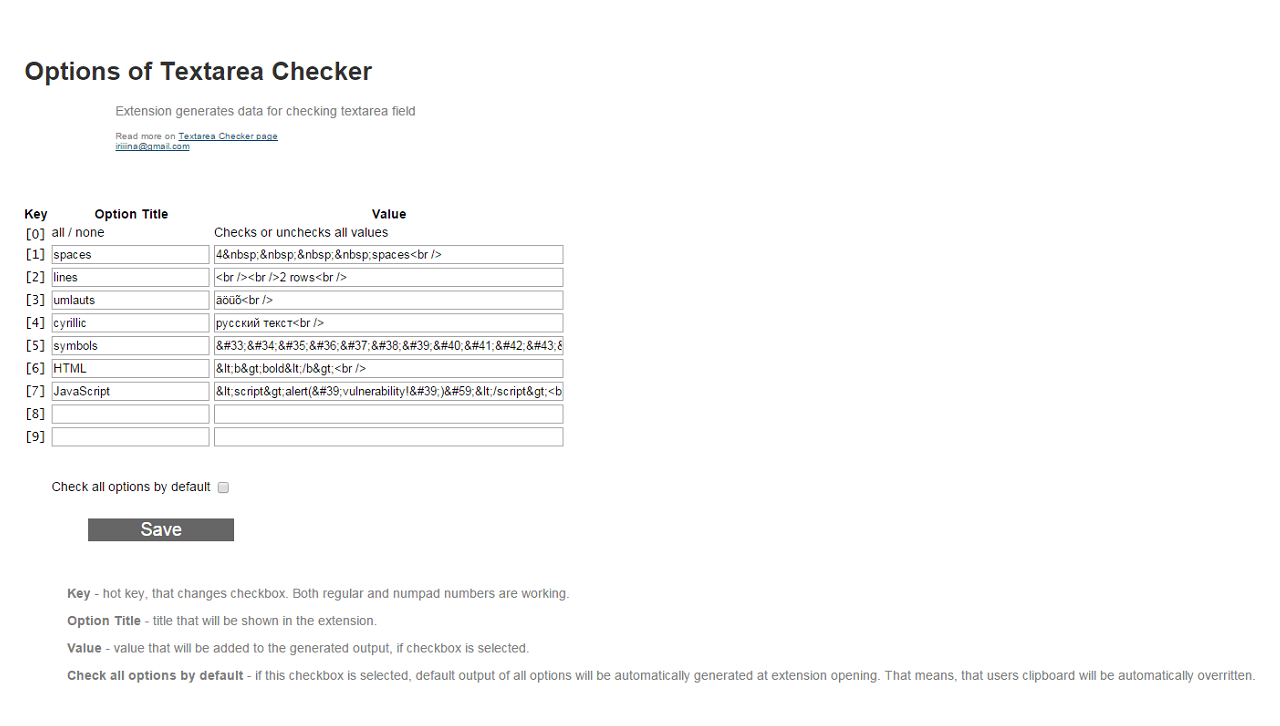
  • Added Options page, where you can define titles and values of the rows (max 9 row - each for number keys).
  • Hot keys now work with numpad numbers too.
  • In the Options user can choose does he want to generate first output right after extension opening.

December 11, 2014

Textarea Checker v0.1

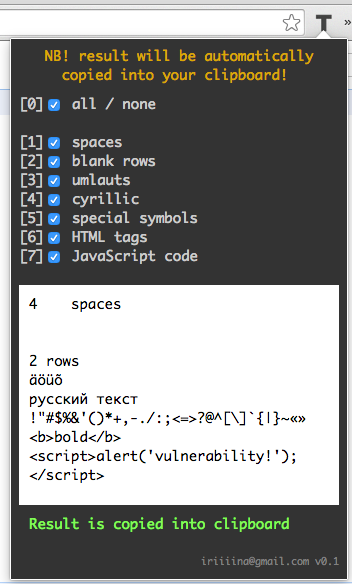
Lately we had some development at work where textarea fields were involved. Turned out that problem with displaying special symbols is quite popular one, so we decided to make template with all kinds of symbols that we can just copy into all fields.

Template is good, but extension is better, so I did new one – Textarea Checker (very raw version).

For now it has just some very basic hard coded options, but I have plans to do these options editable, so everyone can set up his own template.

Another plan is to make output more readable. User obviously need to compare two texts – what was inserted and what is displayed – and this comparing should be as intuitive as possible, without needing to looking back what was actually inserted.

Personal challenge in this extension was that fact, that in last versions of Chrome selection of the textarea text textareaElement.select(); doesn't work, so I can't select output to make copy process faster (as it was in stringG). That's why I decided to automatically write output into user's clipboard, so, basically, do the copy for him.
With that decision two more challenges came up. First one – that means that I can't give some default value on extension opening, because there is possibility that extension was opened accidentally and user really didn't want to overwrite his clipboard value. So users who opened extension on purpose have to do one extra step to get some result (press 0, for example). Second one – as extension returns HTML and JavaScript codes I had problems with plain and rich text formats. So to make text in output and text in clipboard identical I need to return it into div element as HTML text (not into textarea like in the stringG).

One more challenge – hot keys. In this case I need to listen events not on some elements (as in stringG or spanD), but on whole document. That means, that every key click starts some process, which means, that regular selection and copying with Ctrl+C may not work, because Ctrl unselects the text and there is no value to copy.
Textarea Checker


See new posts:
December 16, 2014 Textarea Checker v1.0

September 20, 2014

URL With Parameter Opener v1.0

Analysts in our project really liked my extension JIRA Issue Opener and ordered me one more similar extension, which have to open URL with one parameter. Basically the same extension, but without adding /browse to URL.

They need it because they often need to open prototype URL with different page ID-s: http://prototype.example.com/project/index.php?id=888, where last number 888 can be changed according to page that you want to open.

So I made new extension URL With Parameter Opener and now I am a little bit confused what should I do with JIRA and Fisheye Commit Graph Openers – seems like I don't need them anymore.
URL With Parameter Opener

September 17, 2014

JIRA Issue Opener v1.1

New version of JIRA Issue Opener with better trimming system is available!


JIRA Issue Opener

In latest version
  • All spaces in the beginning and in the end will be trimmed
  • Skype formatting will be trimmed:
    [16.09.2014 13:34:34] Irina Ivanova: KEY-776
    will be recognized as KEY-776

Fisheye Commit Graph Opener v1.3

New version of Fisheye Commit Graph Opener is available.


In latest version
  • Name change: fisheyeGraph became Fisheye Commit Graph Opener (more clear and intuitive)
  • Autocomplete size is enraged from 3 to 5 rows
  • Added error message for blank value

September 12, 2014

JIRA Issue Opener v1.0

In our project we use JIRA. And sometimes someone in our team doesn't send link to issue, but sends only its key (I don't know why). So I wanted to somehow simplify JIRA issue opening process with its key.

I found 3 existing Chrome extensions that cat do that, but they had their own cons:
  • JIRA assistant for Google Chrome
    First of all – it's too complicated. There is a lot of functionality that I don't need. For example, you need to insert not only URL of your JIRA, but also username and password (I don't want to save that info in extension). It also makes address bar in your browser into JIRA console after typing "jira " – I can't use searching because of that (when I want to google something about JIRA I start with "jira..."). And finally, there is no autofocus in field where I can insert key, so I need to do one extra click.
  • SearchInJIRA
    Simple, nice (design is very similar to mine), but I didn't understand what king of URL you need to insert into Options. Some magic URL of the JIRA search – I don't know that one.
  • GoToJIRA
    Again simple and nice. And again, problem with the URL. In the Options you need to insert URL/browse/KEY-OF-THE-PROJECT (and into extension field you need to insert only final number), which makes impossible to use extension, when you have many projects.

So I did one more extension which simply opens issue in new tab, using your key – JIRA Issue Opener.

You can read details about it on page JIRA Issue Opener v1.0 and find source code on GitLab.


See new posts:
September 17, 2014 JIRA Issue Opener v1.1

September 4, 2014

fisheyeGraph v1.1

New version of fisheyeGraph v1.1 is with autocomplete!
In latest version
  • Autocomplete for key word's field
  • Space trimming in key-word and REPOSITORY values
  • Design and texts improve in Options page
  • Icon improve


See new posts:
September 8, 2014 fisheyeGraph v1.2
September 17, 2014 Fisheye Commit Graph Opener v1.3

September 3, 2014

New Chrome Extension fisheyeGraph v1.0

I use FishEye at work to track and search code changes. And my most favorite page there is Commit Graph. In our project we use a lot of different repositories (I have 4 pages of them), so usually finding right repo takes more time, than I want.

That's why I made a simple Chrome extension fisheyeGraph, which opens Commit Graph of required repo in new tab – you need only to insert key word of repo (which you need to specify in Options):


You can read details about it on new page – Chrome Extension fisheyeGraph v1.0 and find source code on GitLab.

In next version I am planning to do autocomplete (it's actually already done, but I can't make work JQuery in extension).

For me this extension saves 30 seconds on each repo opening – some of the pages, that I need to open in order to get to Commit Graphs by hands are heavy – using extension I just skip them.


See new posts:
September 4, 2014 fisheyeGraph v1.1
September 8, 2014 fisheyeGraph v1.2
September 17, 2014 Fisheye Commit Graph Opener v1.3

April 12, 2014

spanD v1.1

New version of spanD is now with new dev design too!
 

In latest version
  • New dev design
  • New icon
  • Shows result only if it is not NULL (difference between 0 and NULL)
  • Smart focusing: when You focusing on span calculation, the bottom part of date addition is shadowed. And vice versa

April 8, 2014

stringG v3.2

New version of stringG is available with new dev design!


There is no new functionality - only design. I am reading Testing Applications on the Web (by Hung Q. Nguyen, Bob Johnson and Michael Hackett) and the chapter about design and performance made me think about software target users. So I decided that testers (and all IT users) will like so called terminal design with dark background and monospace font.
Also I am using now new text editor Atom. I'll write about it later when I get enough experience with it.

March 18, 2014

stringG v3.1

New version of String Generator with new name stringG is available!
Working with string generatorWorking with length calculator

So main new functionality is disabling not active part as You can see on pictures. When You focusing on string generating the bottom part of length calculation is shadowed. And vice versa - if You focusing on bottom part of length calculation the top part is shadowed.

One more big change - new name. Reason is simple: String Generator is too long and I believe that good name is a short one, so stringG it is.

I've already wrote previously about using LeanKit software for organizing stringG (and spanD) projects. They give full Portfolio edition free of charge for first 30 days. So meanwhile my free Portfolio edition has expired and now I am using the Basic level. I was afraid, that I'll loose a lot of good functionality, but actually I haven't lost anything - the Basic level gives all what I need for such small projects. So, if You need a tool for organizing Your tasks - LeanKit is a really good candidate.


See new posts:
April 8, 2014 stringG v3.2

March 3, 2014

spanD v1.0

New version of SpanD (old name Span of Datetimes) is available at Google Store!


In latest version
  • Name change: Span of Datetimes -> SpanD
  • Code refactoring according to Google Security Tips
  • Now You can insert date and time into one field
  • Now You it is possible to use d.mm.yyyy format (1.01.2014, not 01.01.2014)


See new posts:
April 12, 2014 spanD v1.1

March 1, 2014

String Generator v3.0

New version of String Generator extension is available:

Changes in last version:
  • Code refactoring according to Google Security Tips
  • Design changes
One important update in the process: this is the first version, when I tried to use agile process management tool LeanKit (I heard about it on Saturday Agile X) - really useful tool for managing small projects (maybe big too), now developing process is more organized. And nice thing that it is free of charge (basic mode).


See new posts:
March 18, 2014 stringG v3.1
April 8, 2014 stringG v3.2

January 4, 2014

String Generator v2.4

New version 2.4 of String Generator extension is now available in Google Store.

In latest version:
  * Code refactoring according to Uncle Bob's clean code philosophy
  * Now space is actually on 10th character (was on 11th and on 15th with umlauts)

And source code is also available on GitLab - https://gitlab.com/irina-ivanova-extensions/stringG


See new posts:
March 1, 2014 String Generator v3.0
March 18, 2014 stringG v3.1
April 8, 2014 stringG v3.2

January 3, 2014

Span Of Datetimes v0.4

New version of Chrome extension Span Of Datetimes v0.4.

In Latest Version:
  * Code refactoring according to uncle Bob's clean code philosophy
  * Small design changes
  * Hot keys:
    - Arrow Down key in the upper block field sets focus on the bottom block
    - Arrow Down key in the bottom section sets focus on the second line
    - Arrow Up key in the bottom block field sets focus on the upper block
    - Arrow Up key in the upper section sets focus on the first line
    - Arrow Right key sets focus on the right field (if there is one)
    - Arrow Left key sets focus on the left field (if there is one)

And now source code is available on GitLab - https://gitlab.com/irina-ivanova-extensions/spanD (finally I understood the value of release history).


See new posts:
March 3, 2014 spanD v1.0
April 12, 2014 spanD v1.1

December 4, 2013

String Generator v2.3

New version of String Generator:


In latest version:
* Code refactoring according to uncle Bob's clean code philosophy
* Hot keys:
  - Left arrow checks Number type
  - Right arrow checks Text type
  - Up arrow checks/unchecks Space checkbox
  - Down arrow checks/unchecks Umlaut checkbox
  - Tab sets focus on bottom textarea to insert the String for length calculation


See new posts:
January 4, 2014 String Generator v2.4
March 1, 2014 String Generator v3.0
March 18, 2014 stringG v3.1
April 8, 2014 stringG v3.2

December 3, 2013

Span Of Datetimes v0.3

New version of Span Of Datetimes:

In new version:
* I did some code refactoring according to uncle Bob's clean code philosophy
* Now work with minutes too
* Addition result is automatically selected and ready for copying
* Addition result is now in more familiar format: for example if time is 5 hours and 1 minute in shows 05:01, not 5:1


See new posts:
January 3, 2014 Span Of Datetimes v0.4
March 3, 2014 spanD v1.0
April 12, 2014 spanD v1.1

November 20, 2013

Span Of Datetimes v0.2

As usually, right after pilot version there is second version on the other day - Span of Datetimes.

In new version:
* Fixed tab indexes:
-- 1 start date
-- 2 end date (because dates are mandatory and time not)
-- 3 start time
-- 4 end time
-- 5 days to add
-- 6 hours to add
-- 7 date for adding
-- 8 time for adding

* New regular expression: now it is possible to enter a date and time without a symbols. For example 10122013 1000.

* Arrow down key in the first section (span) is makes to jump focus down and arrow up key in the second section (adding) sets focus in the first section.


See new posts:
December 3, 2013 Span Of Datetimes v0.3
January 3, 2014 Span Of Datetimes v0.4
March 3, 2014 spanD v1.0
April 12, 2014 spanD v1.1

November 18, 2013

Span Of Datetimes v0.1

I have a lot of situations at work when I have to test the span of dates. For example, software should automatically calculate the date in 160 days from sysdate. Or it should calculate the number of days between two dates. Usually I used different online calculators for that kind of stuff, but at last decided to write a Chrome extension (which is more convenient).

So, here is the pilot version of Span of Datetimes.

As always, the main point is in simplicity and speed: you can use this extension only with keyboard - completely without a mouse!

Useful things that may be interesting for users:
* Regexps for inserting dates and times:
Dates /([0,1,2,3][0-9])[\., \,, \-, \/]([0,1,2][0-9])[\., \,, \-, \/]([1,2][0-9][0-9][0-9])/
Times /([0,1,2][0-9])[:, \., \,. \-]([0,1,2,3,4,5][0-9])/

* Format for date input is european DD.MM.YYYY.
* Works with negative values! For example, add -1 days to 02.10.2013 will be 01.10.2013.

One thing that I really wanted to do, but didn't succeed - masks for input fields. I used a jQuery for writing a mask functions and it worked in usual HTML page, but it didn't work if a opened same page in extension mode. So it some kind of jQuery-extension integration problem. So I hope I'll do masks in next versions.

And useful tip about browser - you can configure hot-keys for extension in the Google Chrome: * open the extensions tab - chrome://extensions/; * Link "Configure commands" at the bottom;
* Choose an extension and type a shortcut.


See new posts:
November 20, 2013 Span Of Datetimes v0.2
December 3, 2013 Span Of Datetimes v0.3
January 3, 2014 Span Of Datetimes v0.4
March 3, 2014 spanD v1.0
April 12, 2014 spanD v1.1